
WILSON Release Notes - R26.2
Hello WILSON users 👋
This release note provides a brief summary of recent product updates and new features.
📦 This release includes:
- ⚠️ Mobile app: Advance notice of mandatory update
- Mobile app: New version v12827.0.0
- Mobile app: Individual display of activity properties
- Portal: Flexibly show and hide activity properties
- Shift PDF: Content now individually customisable
- Fixed Surcharges for Activities – More Flexible Payroll Calculations
⚠️ Mobile app: Advance notice of mandatory update
The release of the next version of the mobile app is currently scheduled for 6 March 2026. This update will be mandatory from 13 March 2026.
You can expect significant improvements in the creation and editing of activities.
Please ensure that all users of the mobile app update to the latest version during this period. After seven days, the app can only be started after the update has been carried out.
In addition, we will inform all users about the available update via an in-app pop-up.
Mobile app: New version v12827.0.0
The new version of the mobile app brings numerous performance improvements, bug fixes and minor functional enhancements.
It will be available from 27 February 2026 both via the Apple App Store and via Google Play Store.
Please ensure that all users in your company always use the latest version of WILSON to ensure reliable use of the mobile app.
Mobile app: Individual display of activity properties
You can now specify which activity properties can be displayed and edited in the mobile app. This allows WILSON to be even better tailored to your company's operational requirements.
You can find the relevant setting under Administration > Company settings > Activity properties in the ‘Availability in mobile app’ column.
Portal: Flexibly show and hide activity properties

Now you can decide for yourself which activity properties are displayed or hidden in the portal. As an administrator, you can tailor WILSON even more precisely to the requirements of your company.
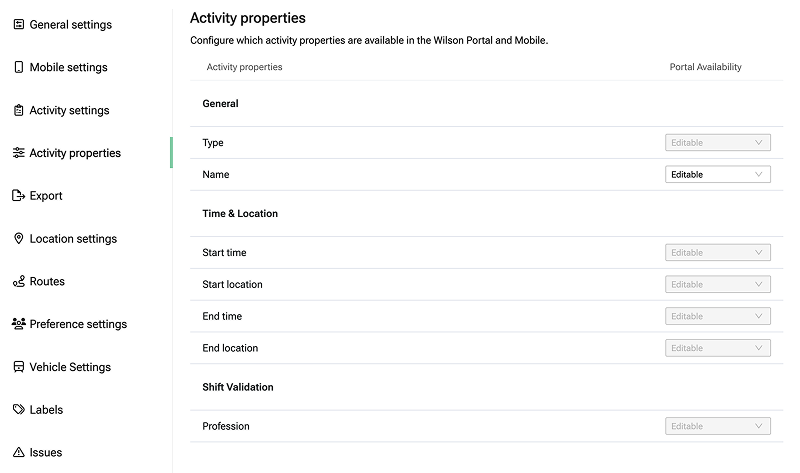
You can find the corresponding setting under Administration > Company settings > Activity properties in the ‘Portal availability’ column.
Shift PDF: Content now individually customisable
You can now individually specify for six activity and shift properties whether or not their values should be included in the shift PDF export.
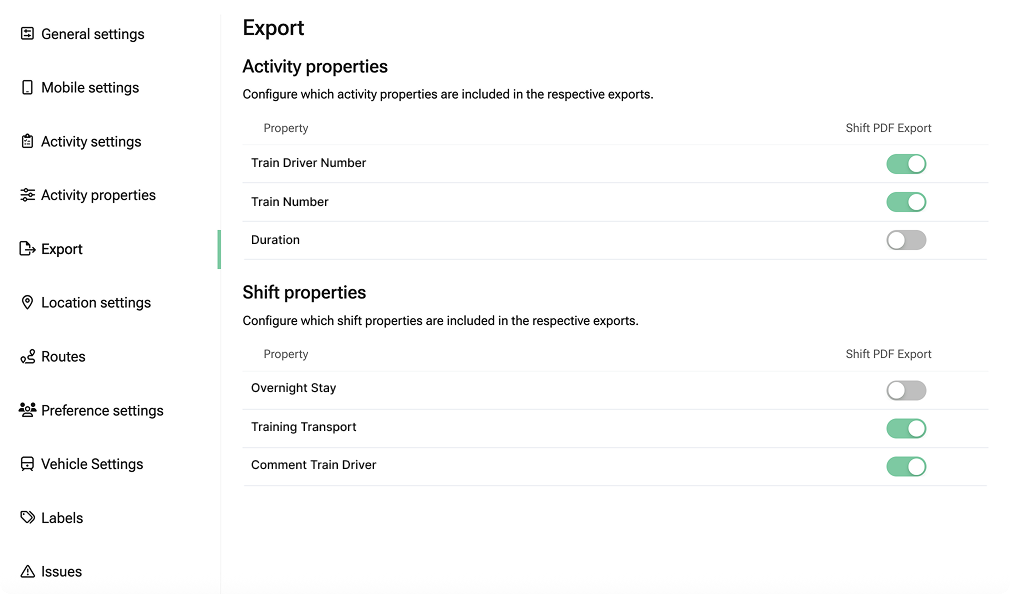
You can find the setting under Administration > Company settings > Export.
Fixed Surcharges for Activities – More Flexible Payroll Calculations

The individual payroll rule for activities has been extended. In addition to the existing percentage-based calculation, you can now also define fixed euro amounts per time range. This allows you to model flat-rate surcharges and compensations much more easily and in line with real-world requirements.
What’s the benefit for you?
You can define fixed amounts that apply once a certain activity duration is reached. During payroll calculation, all applicable time ranges are automatically taken into account and summed up.
Typical use cases include:
Fixed surcharge for travel times over 4 hours, e.g. €50 from the start and an additional €80 after 4 hours
Fixed euro amount for wagon inspectors from 3 hours onwards, regardless of the total duration
Flat-rate activity compensations that should not be calculated on a percentage basis
The existing percentage-based calculation (“share of duration per time range”) remains fully available. You decide per activity which calculation logic fits best – without any additional configuration effort.
This way, even complex payroll rules can be mapped clearly, transparently, and correctly.
Further information can be found in the handbook: Link
Upcoming features we’re working on 🏗️
- Qualifications: Qualification profiles
- Billing: Define combination of ‘invoice’ + ‘RBU’ per business relationship (RBU = invoice-supporting documents)
- Billing: New shift-based RBU format
If you have questions or feedback about the new features, our support team is happy to help.
Enjoy the improvements!